
Connect Apple Health to ChatGPT
There are two ways. In the US, ChatGPT’s built-in Health space can read Apple Health from the ChatGPT iPhone app. Everywhere else — and if you want training plans, interactive workout cards and the same data in other assistants — add the free P.R.O. app as a custom MCP connector at https://mcp.proapp.uk.
You set it up once on chatgpt.com, in about two minutes, and it then works in the ChatGPT iPhone app too.
- Server address
https://mcp.proapp.uk- Sign-in
- OAuth with a one-time code from P.R.O.
- Time
- About 2 minutes
- Recorded
- October 8, 2026
ChatGPT Health or P.R.O.?
Both bring Apple Health into ChatGPT. They differ in where they work and what you get. Checked October 13, 2026.
| Feature | ChatGPT Health | P.R.O. connector |
|---|---|---|
| Where it works | United States only. At launch it excluded the EEA, Switzerland and the UK. | Wherever your ChatGPT plan can add custom MCP servers. |
| ChatGPT plans | Free, Go, Plus and Pro, for users 18+. | Plans that can add custom MCP servers. Recorded on Pro. |
| What ChatGPT reads | The Apple Health data you share in its Health space. | Workouts with routes and pace, sleep stages, heart rate and HRV, daily metrics, goals and your training plan. |
| In the chat | Text answers. | Text answers plus interactive P.R.O. cards for workouts, sleep, plans and training load. |
| Other assistants | ChatGPT only. | The same connection works in Claude, Grok and Codex. |
How to connect ChatGPT
Add P.R.O. on chatgpt.com first. The ChatGPT iPhone app cannot add a custom MCP server; your connection works there after web setup.
Before you start
- P.R.O. on your iPhone, signed in, with Apple Health access allowed. It’s free.
- A browser with chatgpt.com — on a computer or in Safari on iPhone. The ChatGPT app itself can’t add custom servers.
- A ChatGPT plan that can add custom MCP servers. We recorded the steps on ChatGPT Pro.
- Open Plugins in ChatGPT settings.
On chatgpt.com, open Settings → Plugins.
Open ChatGPT settings ↗ - Select Browse directory.
The Customize → Plugins directory opens.
- Select Add.
The menu is in the top-right corner of the directory.
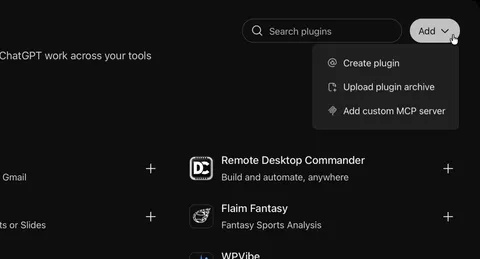
Add → Add custom MCP server, top right of the Plugins directory. - Select Add custom MCP server.
- Enter PRO in Name.
The description and icon are optional.
- Enter https://mcp.proapp.uk in Server URL.
Keep Server URL as the connection type.
- Keep OAuth as Authentication.
Leave Advanced OAuth settings unchanged.
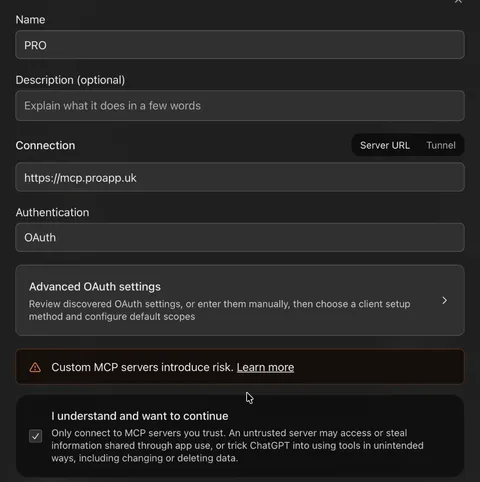
The filled-in form: name PRO, server URL https://mcp.proapp.uk, OAuth. - Select I understand and want to continue.
Read the custom MCP server notice first.
- Select Create as a plugin.
The Connect PRO authorization prompt opens.
- Select Continue to PRO ↗.
The P.R.O. authorization page opens. Complete the access steps below.
On your iPhone, open P.R.O. → Settings → MCP Connect and tap Get connection code. Enter the six-character code on the authorization page and select Connect. The code works once, for 10 minutes.
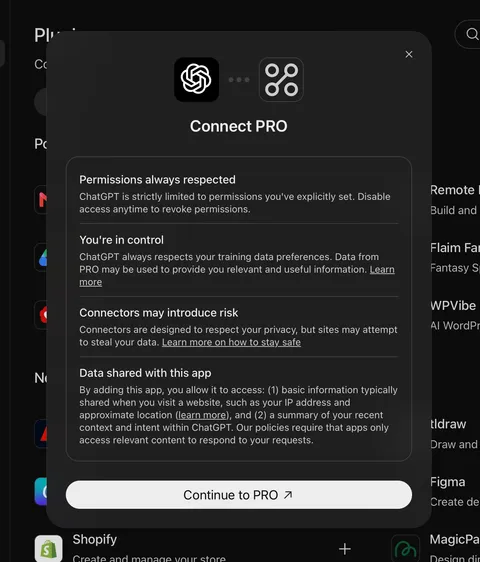
ChatGPT’s own notice, then Continue to PRO. - Check that PRO appears under Installed.
Your ChatGPT account is connected. You can now use P.R.O. on the web and in the iPhone app.
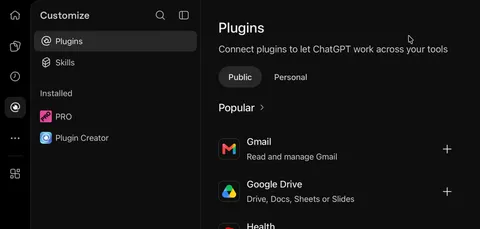
Done: PRO is listed under Installed.


Recorded on ChatGPT Pro · October 8, 2026. Interfaces change; if a menu looks different, see ChatGPT’s own setup help ↗
What to ask ChatGPT
Ask in your own words. ChatGPT calls P.R.O. when it needs your data.
- “How did I sleep this week compared with last week?”
- “Show my last run with the route and pace by kilometre.”
- “Am I on track for my half-marathon plan?”
- “Is my training load too high right now?”
- “How did my resting heart rate and HRV change after long runs?”
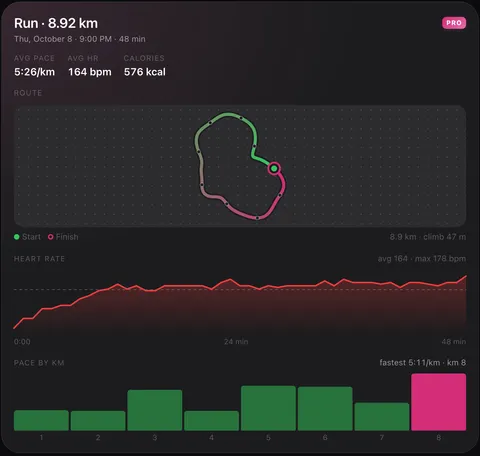

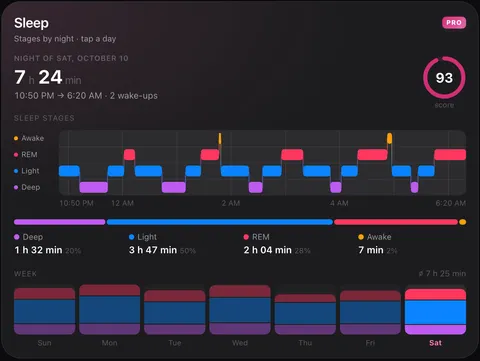

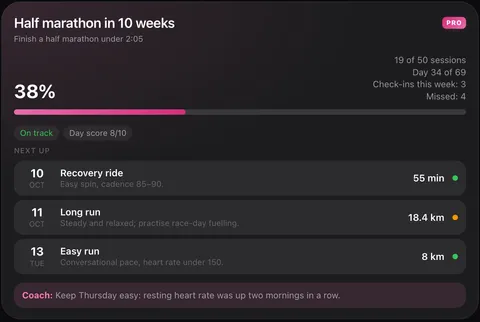

P.R.O. cards in ChatGPT’s dark theme, shown with P.R.O.’s demo account.
If something goes wrong
I can’t find Add custom MCP server.
It isn’t in Settings → Plugins itself. Select Browse directory there, then Add in the top-right corner of the directory. The ChatGPT iPhone app has no such option — use chatgpt.com.
The code is rejected.
Each code works once and expires after 10 minutes. Get a new one in P.R.O. → Settings → MCP Connect.
ChatGPT answers without my numbers.
Make sure PRO is enabled for the chat, or ask “use P.R.O.” in your message. Open P.R.O. on your iPhone so the latest workouts sync.
Questions about ChatGPT and Apple Health
Can ChatGPT read my Apple Health data?
Yes. In the US, ChatGPT Health can read Apple Health from the ChatGPT iPhone app. In other countries, or if you want training plans and interactive workout cards, connect the free P.R.O. app as a custom MCP connector at https://mcp.proapp.uk.
What is the difference between ChatGPT Health and P.R.O.?
ChatGPT Health is OpenAI’s built-in health space, available in the US. P.R.O. is a free iPhone app that syncs Apple Health and serves it to ChatGPT through an MCP connector: it works outside the US, adds interactive cards for workouts, sleep and training plans, and the same connection also works in Claude and Grok.
Does ChatGPT Health work in the UK or the EU?
At launch OpenAI excluded the EEA, Switzerland and the UK from ChatGPT Health. The P.R.O. connector works there as long as your ChatGPT plan can add custom MCP servers.
Can I set it up in the ChatGPT iPhone app?
Not directly: the iPhone app has no option to add a custom MCP server. Add P.R.O. once on chatgpt.com — Safari on iPhone works — and the connection then appears in the iPhone app as well.
Which ChatGPT plan do I need?
One that lets you add custom MCP servers in Settings → Plugins. We recorded the setup on ChatGPT Pro; other plans have not been verified. The P.R.O. app and connector are free.
Is my health data used to train ChatGPT?
P.R.O. only answers the requests ChatGPT makes while you chat, for the categories you allow. Those answers become part of your ChatGPT conversation, so ChatGPT’s data controls apply — you can turn off “Improve the model for everyone” in ChatGPT settings.
P.R.O. reads only the Apple Health categories you allow and you can disconnect ChatGPT any time in Settings → MCP Connect.
P.R.O. provides fitness and wellness information, not medical advice.

