
Connect Apple Health to Claude
Claude has its own Apple Health integration, but it’s a beta for US Pro and Max subscribers in the Claude iPhone app. Anywhere else, or if you want training plans and interactive workout cards, add the free P.R.O. app as a custom connector at https://mcp.proapp.uk.
It takes about two minutes, and Claude can then answer from your real workouts, sleep, heart rate and HRV.
- Server address
https://mcp.proapp.uk- Sign-in
- OAuth with a one-time code from P.R.O.
- Time
- About 2 minutes
- Recorded
- October 10, 2026
Claude’s Apple Health integration or P.R.O.?
Both bring Apple Health into Claude. They differ in where they work and what you get. Checked October 13, 2026.
| Feature | Claude’s Apple Health integration | P.R.O. connector |
|---|---|---|
| Status | Beta. | Available now. |
| Where it works | United States only. | Wherever your Claude plan supports custom connectors. |
| Claude plans | Pro and Max. | Plans with custom connectors. |
| Apps | Claude iPhone app. | Claude on iPhone (recorded), claude.ai and Claude desktop. |
| In the chat | Text answers from the health data you share. | Text answers plus interactive P.R.O. cards for workouts, sleep, plans and training load. |
| Training plans and coach notes | Not part of the integration. | Your P.R.O. training plan; coach notes if you allow them. |
How to connect Claude
In Claude, open Settings → Connectors. Add P.R.O. as a custom connector and approve access on your iPhone.
Before you start
- P.R.O. on your iPhone, signed in, with Apple Health access allowed. It’s free.
- The Claude app with a plan that supports custom connectors.
- Open Connectors in Claude settings.
The Connectors screen lists your available services.
- Tap +.
The add menu appears in the top-right corner.
- Tap Add custom connector.
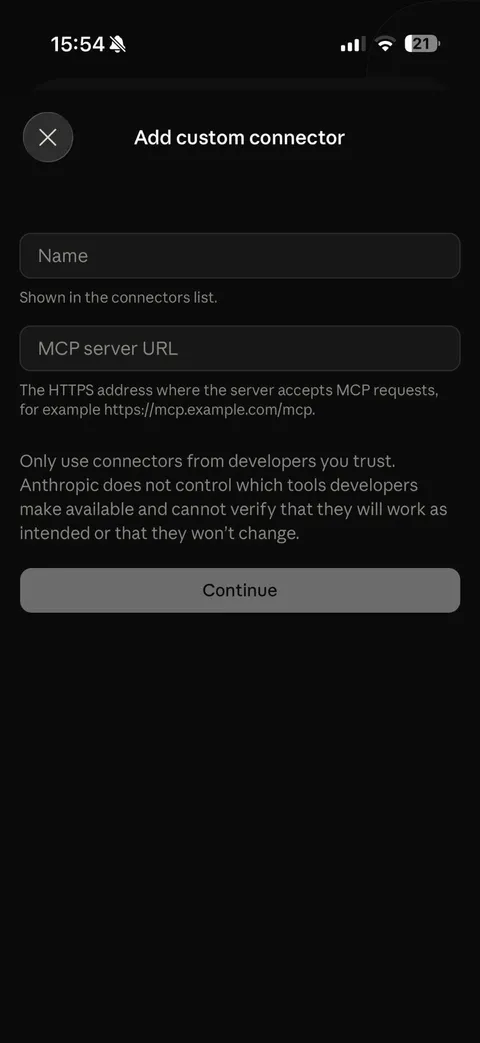
Add custom connector: a name and the server URL. - Enter P.R.O. in Name.
- Enter https://mcp.proapp.uk in MCP server URL.
- Tap Continue.
- Authorize P.R.O.
Follow Claude’s sign-in prompts to the P.R.O. authorization page.
On your iPhone, open P.R.O. → Settings → MCP Connect and tap Get connection code. Enter the six-character code on the authorization page and select Connect. The code works once, for 10 minutes.
- Choose what Claude can access.
In the P.R.O. confirmation, review the data switches, then tap Done.
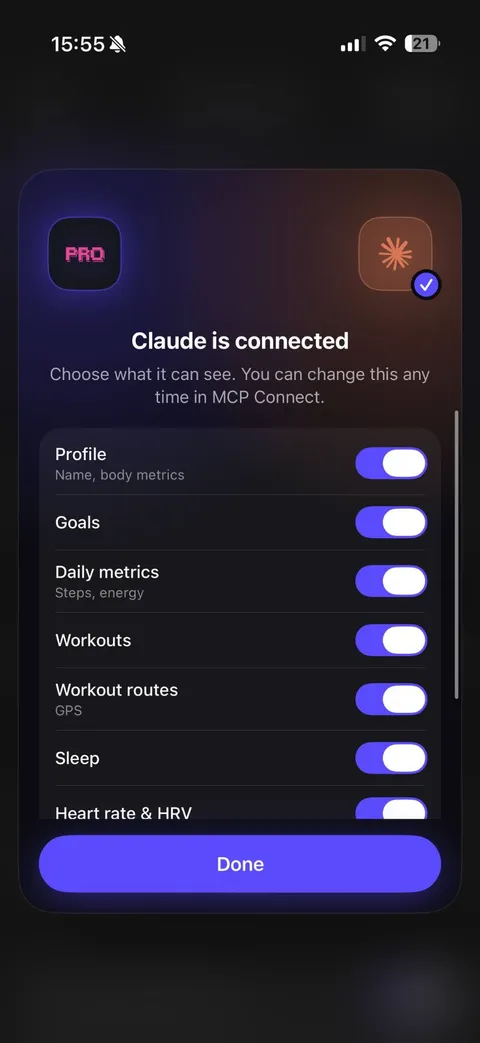
In P.R.O.: choose what Claude can see, then Done.


Recorded on Claude for iPhone · October 10, 2026. Interfaces change; if a menu looks different, see Claude’s own setup help ↗
What to ask Claude
Ask in your own words. Claude calls P.R.O. when it needs your data.
- “Summarise my training week and compare it with last week.”
- “How did my sleep change on the nights after hard sessions?”
- “Build me an easier week based on my recent load.”
- “What was my average heart rate on my last five rides?”
- “Am I on track for my monthly distance goal?”
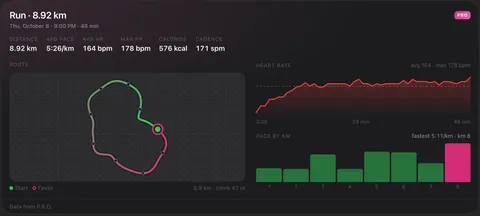

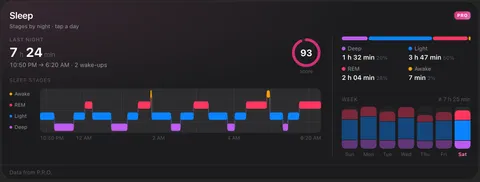

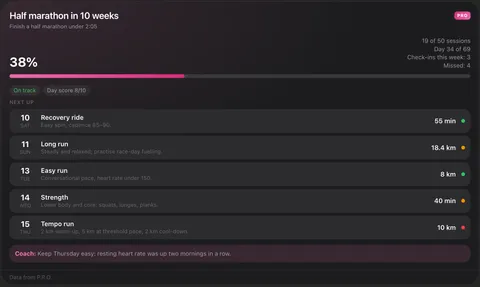

P.R.O. cards in Claude’s dark theme, shown with P.R.O.’s demo account.
If something goes wrong
I can’t find Connectors.
In the Claude app open Settings → Connectors. On a computer, the same screen is in Settings on claude.ai.
The code is rejected.
Each code works once and expires after 10 minutes. Get a new one in P.R.O. → Settings → MCP Connect.
Claude doesn’t use my data.
Check that P.R.O. is turned on for the chat in Claude’s tools menu, and open P.R.O. on your iPhone so the latest data syncs.
Questions about Claude and Apple Health
Can Claude read my Apple Health data?
Yes. Claude’s own Apple Health integration is a beta for US Pro and Max users in the Claude iPhone app. In other countries, or for training plans and interactive workout cards, add the free P.R.O. app as a custom connector at https://mcp.proapp.uk.
Does Claude’s Apple Health integration work outside the US?
Not yet: Anthropic describes it as a beta for US users on Pro and Max plans. The P.R.O. connector is not limited to the US.
Do I need Claude Pro?
You need a Claude plan that supports custom connectors. The P.R.O. app and its connector are free.
Can Claude change my Apple Health data?
No. P.R.O. never writes to Apple Health. If you allow it, Claude can save short coach notes inside P.R.O.; that option is off by default.
How do I remove Claude’s access?
In P.R.O., open Settings → MCP Connect, tap × next to Claude and confirm Disconnect. Removing the connector only inside Claude does not revoke its P.R.O. access.
P.R.O. reads only the Apple Health categories you allow and you can disconnect Claude any time in Settings → MCP Connect.
P.R.O. provides fitness and wellness information, not medical advice.

