
Connect Apple Health to Codex
Codex can’t open Apple Health on its own. Add the free P.R.O. app as an MCP server in the ChatGPT desktop app, and Codex can read your workouts, sleep, heart rate and HRV, then analyse them with code, build charts and export tables.
Setup takes about two minutes. The server is saved in Codex’s own settings, which the Codex CLI and IDE extension share; regular ChatGPT chats have their own setup.
- Server address
https://mcp.proapp.uk- Sign-in
- OAuth with a one-time code from P.R.O.
- Time
- About 2 minutes
- Recorded
- October 8, 2026
How to connect Codex
In the ChatGPT desktop app, add P.R.O. as an MCP server in Settings, then sign in with a one-time code from your iPhone.
Before you start
- P.R.O. on your iPhone, signed in, with Apple Health access allowed. It’s free.
- The ChatGPT desktop app. We recorded on a Mac, when Codex ran in the Work tab; OpenAI now describes Codex as a separate view you pick from the app’s menu.
- A ChatGPT plan that includes Codex and custom MCP servers. We recorded the steps on ChatGPT Pro.
- Open Settings in the ChatGPT app for Mac.
Click your avatar in the bottom-left corner and choose Settings, or press ⌘,.
- Open Plugins under Integrations.
The page says “Manage plugins, skills, and MCPs”, with the tabs Plugins, Apps, MCPs and Skills.
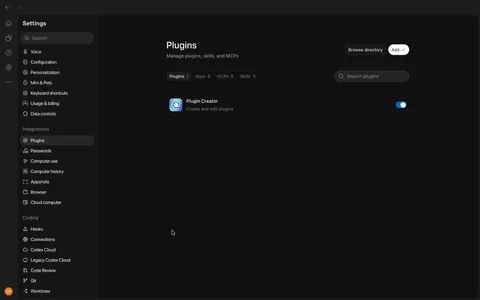
Settings → Integrations → Plugins. - Select Add, then Add MCP server.
Not Create plugin — that opens a chat with the Plugin Creator instead of a form.
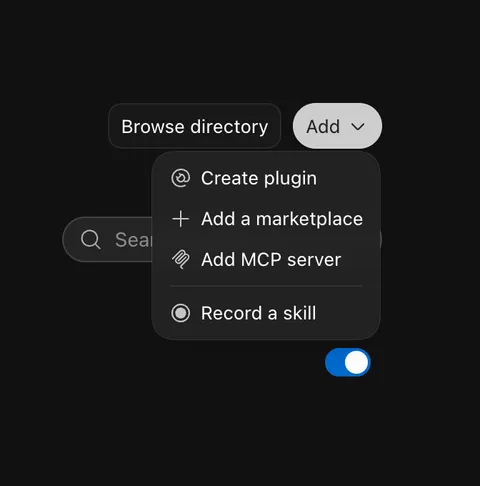
Add → Add MCP server. - Enter P.R.O. as the name and switch the type to Streamable HTTP.
The form starts on STDIO with a command and arguments; ignore those.
- Enter https://mcp.proapp.uk as the URL and select Save.
Leave the bearer token and headers empty: P.R.O. signs you in with a one-time code instead. If the app offers Restart after saving, select it — OpenAI’s docs include that step.
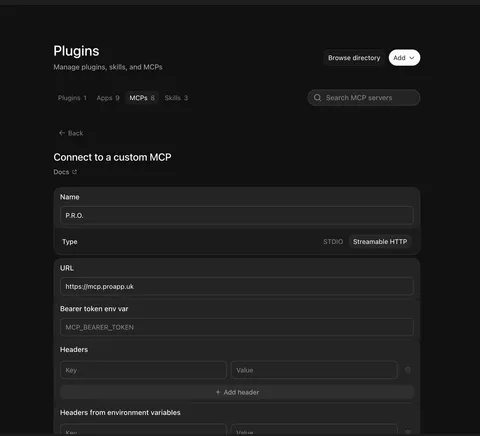
Name, Streamable HTTP and the P.R.O. address. Nothing else to fill in. - Open the MCPs tab and select Authenticate next to P.R.O.
Your browser opens the P.R.O. sign-in page. It says “Connect Codex to your P.R.O. data”.
On your iPhone, open P.R.O. → Settings → MCP Connect and tap Get connection code. Enter the six-character code on the authorization page and select Connect. The code works once, for 10 minutes.

P.R.O. in the MCPs list, waiting for Authenticate. - Close the browser tab when it says Authentication complete.
Back in Settings → Plugins → MCPs, the Authenticate button is gone and P.R.O. is switched on.
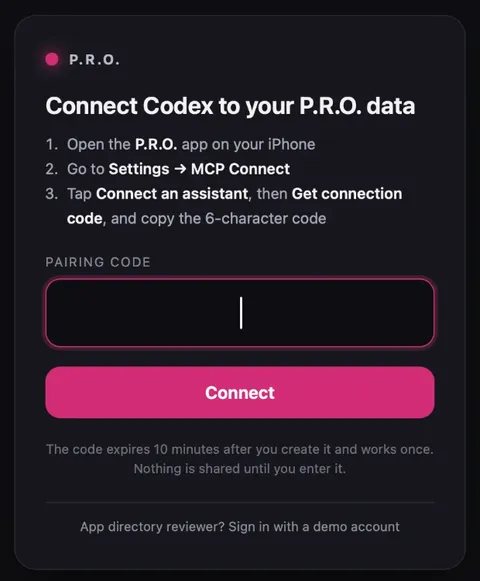
Type the six-character code from P.R.O. and select Connect. - Ask Codex.
In P.R.O. on your iPhone, Settings → MCP Connect now lists Codex under Connected.
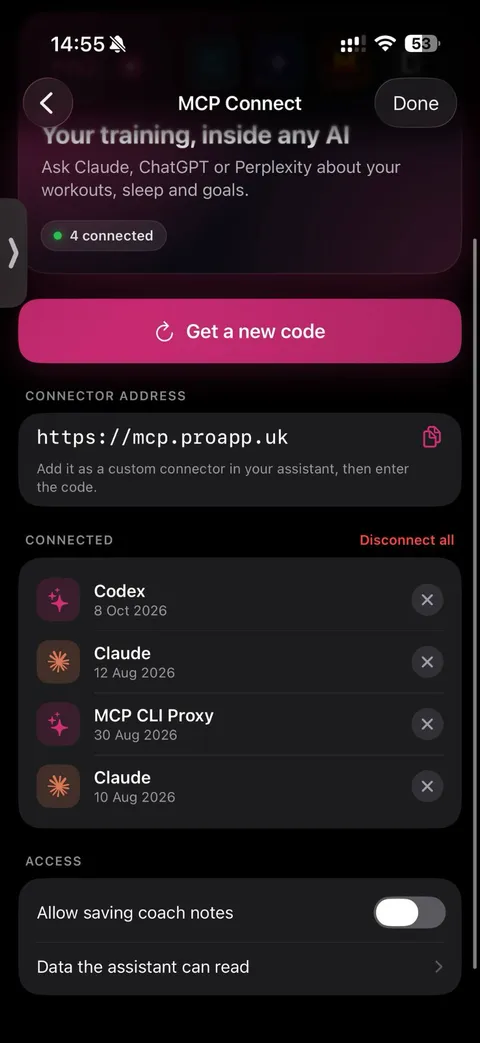
In P.R.O., Codex appears under Connected.


OpenAI’s docs describe the same form as Settings → MCP servers → Add server: enter a name, choose Streamable HTTP, enter the URL, save, then select Restart and Authenticate. If your app shows MCP servers instead of Plugins, follow that path — the form and the address are the same.
Set up from the command line
Prefer the terminal? With the Codex CLI, add the server and sign in. The desktop app, the CLI and the IDE extension share this configuration.
codex mcp add pro --url https://mcp.proapp.uk
codex mcp login pro
The login command opens the P.R.O. sign-in page in your browser. We recorded the desktop app; the CLI commands follow OpenAI’s docs.
Recorded in ChatGPT for Mac · October 8, 2026. Interfaces change; if a menu looks different, see Codex’s own setup help ↗
What to ask Codex
Ask in your own words. Codex calls P.R.O. when it needs your data.
- “Load my runs from the last six months and chart weekly distance and pace.”
- “Export my workouts to a CSV and summarise them by sport.”
- “Find weeks where my resting heart rate rose after hard sessions.”
- “Compare my sleep before and after I started evening runs.”
- “Write a script that flags days my HRV was well below my 30-day average.”
If something goes wrong
A chat with the Plugin Creator opened.
You picked Create plugin in the Add menu. Close that chat and choose Add MCP server instead.
P.R.O. doesn’t answer in a regular chat.
Servers added here belong to Codex. For regular ChatGPT chats, add P.R.O. on chatgpt.com — see the ChatGPT guide.
P.R.O. is listed but Codex doesn’t see its tools.
Select Restart in the MCP settings, or quit and reopen the app, then check that P.R.O. no longer shows Authenticate.
The code is rejected.
Each code works once and expires after 10 minutes. Get a new one in P.R.O. → Settings → MCP Connect.
Questions about Codex and Apple Health
Can Codex read my Apple Health data?
Yes, through the free P.R.O. app: add https://mcp.proapp.uk as an MCP server in the ChatGPT app for Mac and confirm it with a one-time code from P.R.O. Codex then reads the workouts, sleep, heart rate and HRV you allow.
Does connecting Codex also connect regular ChatGPT chats?
No. MCP servers added in the desktop app’s settings belong to Codex and are shared with the Codex CLI and IDE extension. Regular ChatGPT chats use plugins added on chatgpt.com — see the ChatGPT guide.
Is Codex the same as ChatGPT Work?
No. According to OpenAI Help (checked October 27, 2026), ChatGPT now has Chat and Work modes, and Codex is a separate view in the desktop app for coding and data work. When we recorded this guide on October 8, 2026, the Mac app showed Chat and Work tabs, and Codex ran in the Work tab. We have tested P.R.O. in Codex; we have not yet verified it in ChatGPT Work.
Can I add P.R.O. from the Codex CLI?
Yes. Run codex mcp add pro --url https://mcp.proapp.uk, then codex mcp login pro to sign in with a one-time code. The CLI, the IDE extension and the desktop app share this configuration.
Why use Codex instead of a chat for health data?
Codex can write and run code on your data: build charts, export tables, compute rolling averages or check how one metric moves with another. A chat answers questions; Codex can do the analysis.
Which plan do I need?
A ChatGPT plan that includes Codex and lets you add MCP servers. We recorded the steps on ChatGPT Pro. P.R.O. and its connector are free.
P.R.O. reads only the Apple Health categories you allow and you can disconnect Codex any time in Settings → MCP Connect.
P.R.O. provides fitness and wellness information, not medical advice.


